Schema Design
A FLXBL schema defines your data model with entities (like tables) and relationships (graph edges connecting entities).
Visual Schema Editor
The easiest way to design your schema is using the visual Schema Editor in your FLXBL dashboard. Create entities, define fields with dropdown type selectors, and draw relationships by dragging between entity nodes.
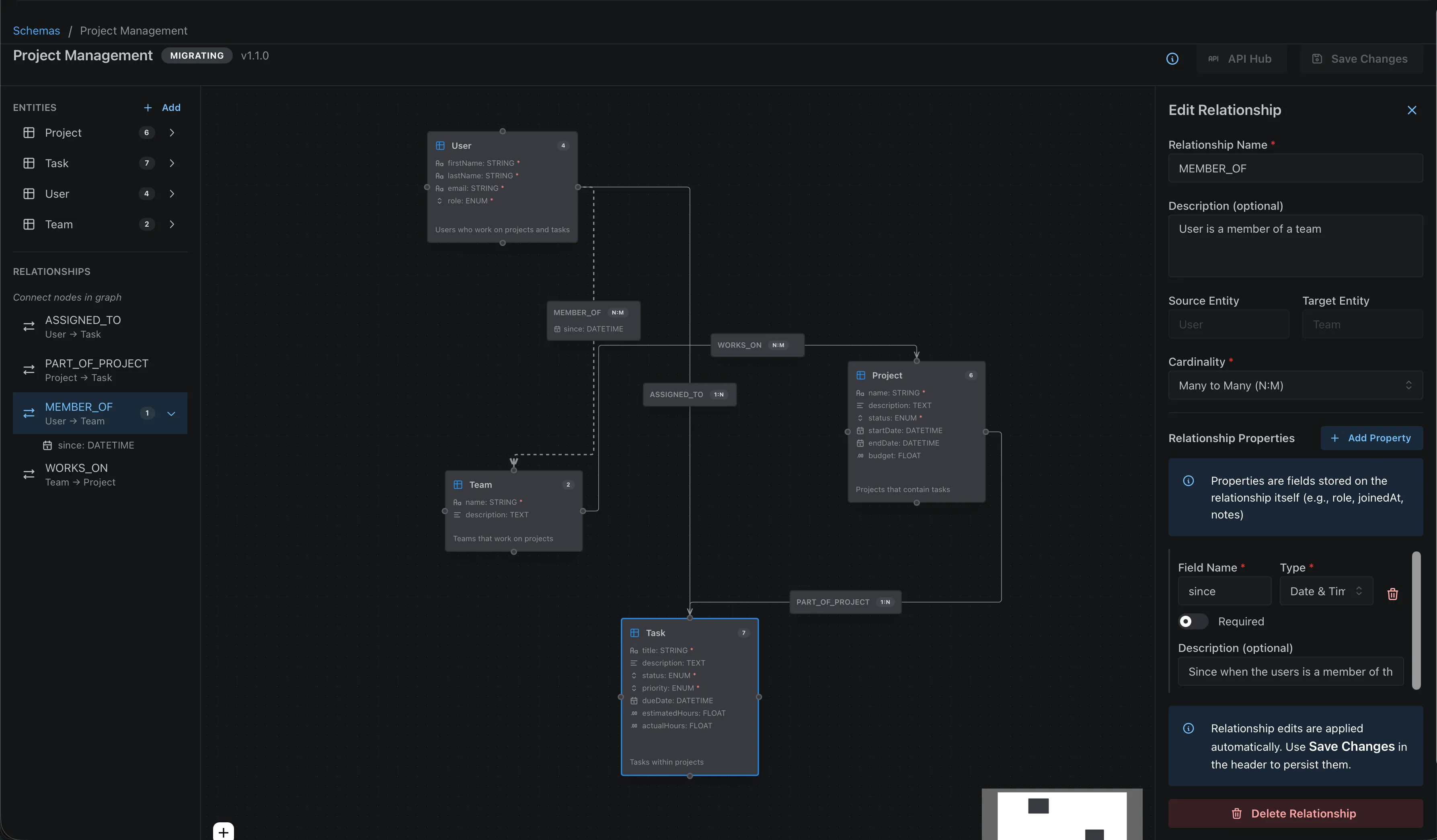
The Schema Editor automatically handles versioning and shows a breaking changes dialog when you modify existing fields.
Entities
An entity represents a type of data in your application. Each entity has a name and a list of fields with types.
{
  "name": "Product",
  "description": "Products available in the store",
  "fields": [
    {
      "name": "name",
      "type": "STRING",
      "required": true,
      "description": "Product display name"
    },
    {
      "name": "description",
      "type": "TEXT",
      "required": false,
      "description": "Detailed product description"
    },
    {
      "name": "price",
      "type": "FLOAT",
      "required": true
    },
    {
      "name": "quantity",
      "type": "NUMBER",
      "required": true
    },
    {
      "name": "isActive",
      "type": "BOOLEAN",
      "required": false
    },
    {
      "name": "publishedAt",
      "type": "DATETIME",
      "required": false
    },
    {
      "name": "metadata",
      "type": "JSON",
      "required": false
    },
    {
      "name": "status",
      "type": "ENUM",
      "required": true,
      "enumValues": ["draft", "published", "archived"]
    },
    {
      "name": "tags",
      "type": "STRING_ARRAY",
      "required": false
    },
    {
      "name": "image",
      "type": "FILE",
      "required": false,
      "description": "Product hero image"
    },
    {
      "name": "embedding",
      "type": "VECTOR",
      "required": false,
      "vectorDimensions": 1536,
      "description": "Product description embedding for similarity search"
    }
  ]
}Field Types
FLXBL supports the following field types:
| Type | Description | Example Values |
|---|---|---|
STRING | Short text (up to 255 chars) | "Hello World" |
TEXT | Long text (unlimited) | Article body, descriptions |
NUMBER | Integer | 42, -10, 0 |
FLOAT | Decimal number | 3.14, 99.99 |
BOOLEAN | True/false | true, false |
DATETIME | ISO 8601 timestamp | "2025-01-15T10:30:00Z" |
JSON | Arbitrary JSON object | {"key": "value"} |
ENUM | Predefined values | "draft", "published" |
PASSWORD | Securely hashed password | Automatically hashed on write |
STRING_ARRAY | Array of strings | ["tag1", "tag2"] |
NUMBER_ARRAY | Array of integers | [1, 2, 3] |
FLOAT_ARRAY | Array of decimals | [1.5, 2.5, 3.5] |
BOOLEAN_ARRAY | Array of booleans | [true, false, true] |
FILE | File reference (S3-compatible storage) | Presigned upload/download URLs |
VECTOR | Embedding vector for similarity search | [0.1, 0.2, ..., 0.9] (float array) |
Field Options
name(required) - Field identifier, must be unique within entitytype(required) - One of the supported field typesrequired(required) - Whether the field must have a valuedescription(optional) - Human-readable descriptionenumValues(required for ENUM) - Array of allowed valuesvectorDimensions(required for VECTOR) - Number of dimensions for the embedding vector (e.g., 1536 for OpenAI, 768 for smaller models)searchable(optional, STRING/TEXT only) - Enable full-text search indexing
File & Vector Fields
Two special field types enable file storage and vector similarity search:
FILE fields store references to files in S3-compatible storage. The upload workflow uses presigned URLs: request an upload URL, upload the file directly to S3, then confirm the upload. See the API Reference for the full file storage endpoints.
VECTOR fields store embedding vectors (float arrays) and enable cosine similarity search.
When creating a VECTOR field, you must specify vectorDimensions to match your embedding model
(e.g., 1536 for OpenAI text-embedding-3-small). Query vectors must have the same number of
dimensions. See the API Reference for the vector search endpoint,
or use client.vectorSearch() in the SDK.
Identity Entities
Any entity can become an identity entity by adding two properties. This enables end-user authentication (registration, login, password reset) for your application's users.
{
  "name": "Customer",
  "isIdentity": true,           // Enables auth endpoints
  "identifierField": "email",   // Field used for login
  "fields": [
    { "name": "email", "type": "STRING", "required": true },
    { "name": "password", "type": "PASSWORD", "required": true },
    { "name": "name", "type": "STRING", "required": false },
    { "name": "role", "type": "STRING", "required": false }
  ]
}When an entity is marked as identity:
- Auth endpoints are enabled —
/register,/login,/reset-password, etc. - The entity remains accessible via Dynamic API — For admin operations like listing users
PASSWORDfields are automatically hashed and redacted — Secure by default
Requirements
| Property | Description |
|---|---|
isIdentity: true | Marks this entity as the identity provider for your tenant |
identifierField | The STRING field used for login (typically email) |
PASSWORD field | At least one field with type PASSWORD |
Learn more in End-User Authentication.
Relationships
Relationships define how entities connect to each other. FLXBL stores these as graph edges in Neo4j, enabling powerful traversal queries.
{
  "relationships": [
    {
      "name": "WROTE",
      "sourceEntityName": "User",
      "targetEntityName": "Post",
      "cardinality": "ONE_TO_MANY",
      "description": "Users write posts"
    },
    {
      "name": "MEMBER_OF",
      "sourceEntityName": "User",
      "targetEntityName": "Team",
      "cardinality": "MANY_TO_MANY",
      "fields": [
        { "name": "role", "type": "STRING", "required": true },
        { "name": "joinedAt", "type": "DATETIME", "required": true }
      ]
    }
  ]
}Cardinality Types
| Cardinality | Description | Example |
|---|---|---|
ONE_TO_ONE | Each source links to exactly one target | User → Profile |
ONE_TO_MANY | Each source links to multiple targets | Author → Posts |
MANY_TO_MANY | Multiple sources link to multiple targets | Products ↔ Tags |
One-to-many modeling: Put the relationship on the source entity withsourceEntityName,targetEntityName, andcardinality: "ONE_TO_MANY". Read the inverse side with generated GraphQL inverse fields or REST/SDK relationship list direction options; do not model the inverse as a separate schema cardinality.
Relationship Properties
Relationships can have their own fields (properties on the edge). This is useful for storing metadata about the connection:
- WROTE: authoredAt, visibility, editorialState
- MEMBER_OF: role, joinedAt
- FOLLOWS: followedAt, notificationsEnabled
Complete Schema Example
Here's a complete schema for a blog application:
{
  "entities": [
    {
      "name": "User",
      "fields": [
        { "name": "email", "type": "STRING", "required": true },
        { "name": "name", "type": "STRING", "required": true },
        { "name": "bio", "type": "TEXT", "required": false }
      ]
    },
    {
      "name": "Post",
      "fields": [
        { "name": "title", "type": "STRING", "required": true },
        { "name": "body", "type": "TEXT", "required": true },
        { "name": "status", "type": "ENUM", "required": true, "enumValues": ["draft", "published"] },
        { "name": "publishedAt", "type": "DATETIME", "required": false },
        { "name": "embedding", "type": "VECTOR", "required": false, "vectorDimensions": 1536 }
      ]
    }
  ],
  "relationships": [
    {
      "name": "WROTE",
      "sourceEntityName": "User",
      "targetEntityName": "Post",
      "cardinality": "ONE_TO_MANY"
    }
  ],
  "description": "Blog schema with users, posts, and authorship relationships"
}Generated API Surface For This Schema
When this schema is active, FLXBL generates entity CRUD routes for
User and Post, plus relationship routes for
WROTE. The same schema also drives the generated GraphQL fields
and TypeScript client helpers.
# Entity CRUD generated from the User and Post entities
POST   /api/v1/dynamic/User
GET    /api/v1/dynamic/User
GET    /api/v1/dynamic/User/:id
PATCH  /api/v1/dynamic/User/:id
DELETE /api/v1/dynamic/User/:id

POST   /api/v1/dynamic/Post
GET    /api/v1/dynamic/Post
GET    /api/v1/dynamic/Post/:id
PATCH  /api/v1/dynamic/Post/:id
DELETE /api/v1/dynamic/Post/:id

# Relationship routes generated from WROTE
POST   /api/v1/dynamic/User/:id/relationships/WROTE
GET    /api/v1/dynamic/User/:id/relationships/WROTE?direction=out
PATCH  /api/v1/dynamic/User/:id/relationships/WROTE/:targetId
DELETE /api/v1/dynamic/User/:id/relationships/WROTE/:targetIdGraphQL can read nested relationship data directly from the generated relationship field:
query {
  users(limit: 10) {
    id
    email
    name
    posts(limit: 5, orderBy: [{ field: "publishedAt", direction: DESC }]) {
      id
      title
      publishedAt
    }
  }
}Schema Validation
Before publishing, you should validate your schema to catch errors:
# Validate a local schema file before publishing
flxbl schema validate --file ./blog.schema.json --json

# Create and activate the schema
flxbl schema create --file ./blog.schema.json --activate --json

# Export generated API contracts for agents, SDKs, and service clients
flxbl api spec --json > openapi.json
flxbl api graphql-schema > schema.graphqlThe validator checks for:
- Reserved entity names (id, createdAt, updatedAt)
- Invalid field types
- Missing required properties
- Duplicate entity or field names
- Invalid relationship references
- Breaking changes from previous versions
Validation, Cross-Entity Rules, And Cascades
FLXBL validates schema shape before activation and validates runtime payloads against the active schema before writing data.
Built-in validation
- Field type, required-field, enum, uniqueness, and vector shape checks.
- Relationship source entity, target entity, cardinality, and property schema checks.
- Relationship writes verify that the source node and target node exist.
- Batch create and update validate all submitted items before writing.
Application-owned behavior
- Cross-entity business invariants, such as totals matching line items.
- Tenant-specific workflows, approvals, and derived status transitions.
- Cascading deletes or reassignments of dependent child entities.
- Long-running orchestration across multiple services or external systems.
For cascading behavior, implement an explicit service workflow: list dependent relationships, delete or reassign child records, remove relationship edges by target id or relationship id, and delete the parent only after the dependent operations succeed.
Best Practices
- Use descriptive names: Entity and field names should be self-documenting
- Add descriptions: Help future developers understand your schema
- Start simple: Begin with core entities and add complexity later
- Use relationships: Graph relationships are more flexible than embedding
- Consider queries: Design your schema based on how you'll query data
Next Steps
- API Reference - Learn about the auto-generated APIs
- Query DSL - Master querying your data
- LLM-Friendly CLI - Use agents to inspect, validate, and generate from schemas